Complete Company Onboarding
Last updated: August 3, 2026
Overview
Company onboarding is the process of registering your business with Zeal so you can begin processing payroll.
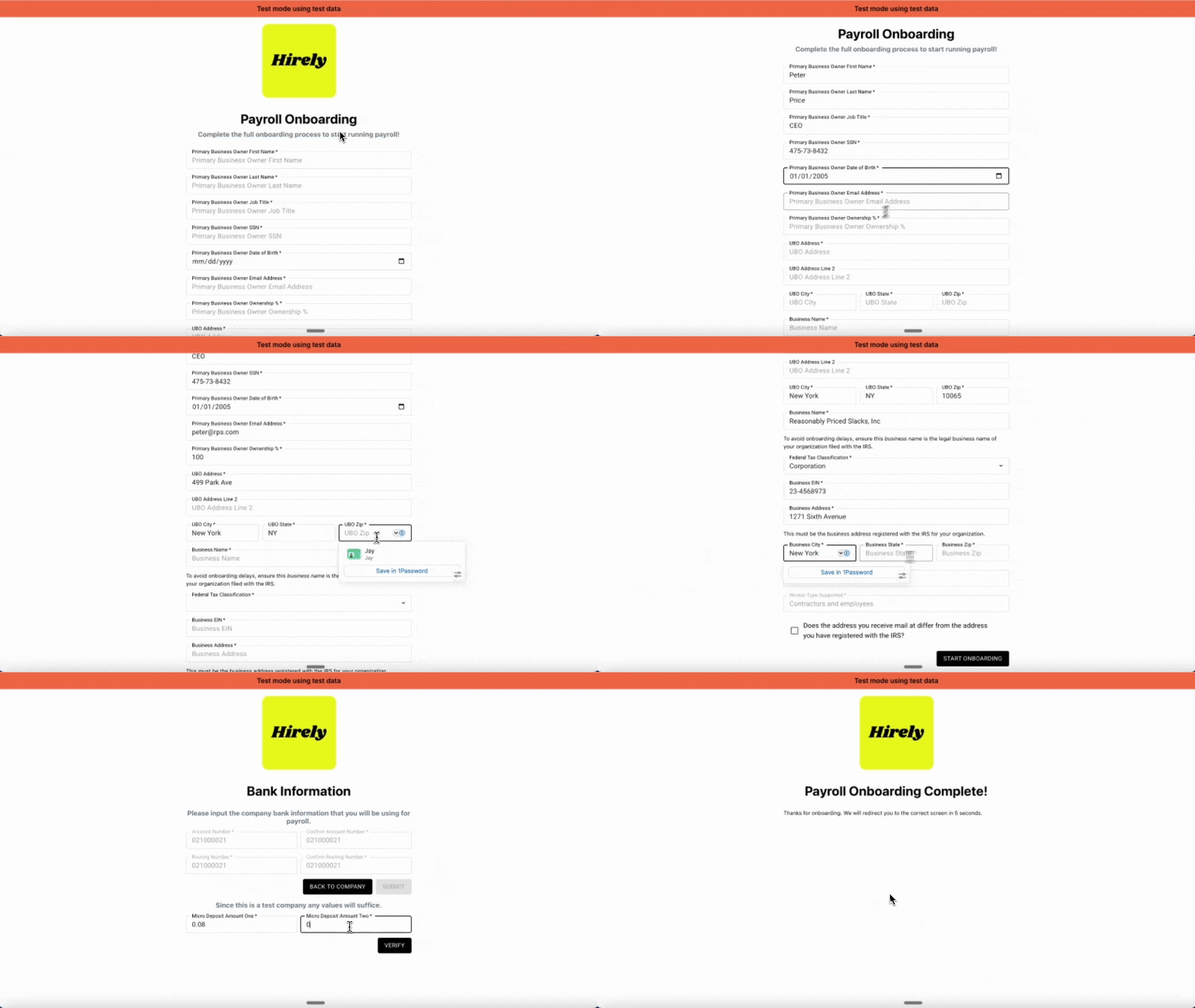
During onboarding, an authorized representative will provide company information, verify their identity, connect the company’s payroll funding account, and complete the required agreements.
Once onboarding is complete, your company will be ready to continue implementation.
Companies (Unique FEINs) are used in Zeal to run payroll. They are able to onboard themselves via a Company Onboarding Link. This article helps outline the flow that at least one individual, with significant authority to act on behalf of the Company, will walkthrough in order to get their Company into Zeal and ultimately ready for live payroll.
Before You Begin
Have the following available:
Legal business name
EIN
Business address
Payroll funding bank account
Information for an owner or authorized representative
The Company Onboarding Flow will entail:
Step 1: Verify the Company Representative
The person completing onboarding should be someone authorized to act on behalf of the company, such as an owner or executive.
They’ll provide:
Name
Job title
Date of birth
SSN
Ownership percentage
Residential address
Identity Verification (KYC)
Zeal performs a Know Your Customer (KYC) verification using this information.
If additional verification is required, Zeal may request supporting documentation before onboarding can continue.
Step 2: Verify Your Business
Next, provide your company’s legal business information.
Required information includes:
Legal business name
EIN
Business address
Phone number
Business Verification (KYB)
Zeal performs a Know Your Business (KYB) verification to confirm your company’s identity.
To avoid delays:
Use your legal business name exactly as it appears with the IRS.
Enter the business address registered with the IRS.
If you operate under a DBA, you can provide documentation after onboarding.
If Zeal can’t automatically verify your business, additional documentation may be requested.
Step 3: Connect Your Payroll Bank Account
Provide the bank account that will fund payroll.
This account is used to debit:
Employee net pay
Employer taxes
Employee tax withholdings
Other payroll-related payments
Verify Your Bank Account
Zeal verifies your bank account using micro-deposits.
After submitting your account information:
Wait 1–2 business days.
Check your bank account for two small deposits.
Return to onboarding and enter the deposit amounts.
Sandbox: Any two values under $1.00 can be entered.
Production: After three failed attempts, additional assistance from Zeal may be required.
Step 4: Review and Sign Agreements
Finally, review and accept the required payroll agreements.
These include:
Form 8821
Form 8655
ACH Authorization
Deposit Account Authorization
E-Sign Consent
Privacy Policy
Terms & Conditions
Your electronic signature will be applied where required.
After Onboarding
Once onboarding is complete, you’ll return to your Company Dashboard.
Depending on your implementation, your company may enter one of several statuses before becoming eligible to process payroll.
Learn more➡ Company Statuses
Zeal is a financial technology company, not an FDIC insured depository institution. Banking services provided by Bangor Savings Bank, Member FDIC. FDIC insurance coverage protects against the failure of an FDIC insured depository institution. Pass-through FDIC insurance coverage is subject to certain conditions.
Mastercard® Debit Card is issued by Bangor Savings Bank, Member FDIC, pursuant to license by Mastercard International Incorporated. Mastercard is a registered trademark, and the circle design is a trademark of Mastercard International Incorporated. Spend anywhere Mastercard is accepted.